-
În urmă cu ceva timp, dar mult timp - anul trecut, acum doi ani, nu mai țin minte - am propus pe grupul de pe Facebook Linux România că este nevoie de câteva reguli, pentru că așa funcționează cel mai bine un grup și orice altceva. Unul dintre administratori a spus că nu este nevoie de reguli, că avem dreptul la liberă exprimare, ceea ce este și adevărat - oamenii trebuie lăsați să vorbească liber.
Dar totuși, în limita bunului simț. Mai jos este o postare care aduce o „primă regulă" în grup, poate nu este prima, dar este una destul de importantă.
În atenția utilizatorilor de Windows din acest grup:
Nu am nimic împotriva voastră. Și eu folosesc Windows 11 la serviciu, deci nu este vorba despre o competiție între sisteme de operare.
Totuși, dacă ați intrat în acest grup doar pentru a provoca discuții și pentru a lăuda Windows la fiecare postare despre Linux, vă rog să vă retrageți. Am ales să păstrăm grupul deschis și pentru utilizatorii de Windows, în speranța că unii dintre voi vor descoperi că există și alte alternative.
Scopul acestui grup este promovarea Linuxului în rândul utilizatorilor de calculatoare, schimbul de experiență și ajutorul reciproc pentru probleme tehnice. Nu este un loc pentru dezbateri interminabile despre cât de „mai bun" este Windows.
De fiecare dată apar aceleași comentarii: „nu merg jocurile", „nu pot face grafică", „nu pot folosi programe specifice Windows". Realitatea este că aceste situații nu reprezintă majoritatea utilizatorilor. Cei mai mulți folosesc calculatorul pentru activități obișnuite și nici măcar nu utilizează aplicațiile profesionale invocate în astfel de discuții.
Dacă nu puteți sau nu doriți să folosiți Linux și nu sunteți interesați de subiect, nu înțeleg de ce rămâneți în acest grup doar pentru a descuraja sau ironiza comunitatea.
Începând de acum, comentariile al căror singur scop este promovarea Windows sau provocarea de conflicte vor fi șterse, iar autorii lor vor fi eliminați din grup. Criticile argumentate și discuțiile civilizate sunt binevenite, însă trollingul și flame-urile nu își au locul aici.
Vă mulțumesc pentru înțelegere și pentru că respectați scopul acestui grup.
Niciun grup, comunitate sau orice altceva nu funcționează fără anumite reguli și restricții, pentru că oamenii, dacă sunt lăsați de capul lor, sunt haotici, dezorganizați - și asta ca să nu scriu ceva mai dur.
Așa se întâmplă și cu alte asociații, grupuri, partide: oamenii intră în partid, iar primul lucru pe care-l fac este să întrebe: „păi nu mai bine schimbăm numele și scopul partidului?"
Este un exemplu clar dat în comentarii de un membru al grupului. Oamenii tot timpul vor să schimbe ceva, chiar dacă nu este în avantajul lor. Au această răutate în sânge și nu înțeleg de unde atâta răutate - nu îi pot pune pe toți în aceeași oală, dar majoritatea sunt răi.
Dacă nu îți place un grup sau o comunitate, pleacă de acolo; dacă nu îți place un clip video, nu te uita la el, și așa mai departe - exemple pot fi multe.
-
-
Dacă ai auzit de Freenet acum câțiva ani și l-ai asociat cu partajare anonimă de fișiere, ce găsești azi pe freenet.org e un program diferit, sub același nume. Merită povestea, pentru că spune multe despre cum evoluează un proiect vechi de peste două decenii.
Ce este Freenet
Freenet-ul de acum e o platformă peer-to-peer pentru aplicații descentralizate: chat, colaborare, mesagerie, fără să depinzi de un server central. Nodurile formează o rețea organizată sub forma unui inel, iar mesajele ajung la destinație în câțiva pași, indiferent câte milioane de noduri sunt în rețea.
Diferența față de vechiul Freenet nu e doar de nume, e de concepție. Varianta clasică semăna cu un hard disk descentralizat: stocai și recuperai fișiere anonim. Cea de acum e mai aproape de un calculator descentralizat, adică poți construi aplicații întregi care rulează peer-to-peer, nu doar stoca date. Cheile din rețea sunt de fapt contracte WebAssembly, cod care definește cum se validează și actualizează datele. Practic, aplicațiile ca River (chat de grup) arată și se comportă ca niște situri normale în navigator, dar codul lor trăiește distribuit în rețea, nu pe un server al cuiva.
Un lucru important de reținut: spre deosebire de vechiul Freenet, cel nou nu oferă anonimitate din construcție. Scopul e descentralizarea, nu ascunderea identității. Dacă ai nevoie de anonimitate, proiectul spune clar că poți pune un strat suplimentar peste, dar nu vine implicit.
Puțină istorie
Povestea începe în 1999, când Ian Clarke, pe atunci student la Universitatea din Edinburgh, a scris o lucrare despre un sistem descentralizat de stocare și recuperare a informației. A luat notă mică la lucrare, dar a publicat-o pe internet și a strâns voluntari care să o transforme în cod. Așa a apărut Freenet-ul original.
Proiectul a trecut prin mai multe reinventări majore. În 2005 a avut loc o rescriere completă, de la versiunea 0.5 la 0.7, care a introdus rețeaua de tip "friend-to-friend". În 2012 a existat o încercare de succesor, numit "Tahrir", care nu a ajuns nicăieri. Abia în 2019 Ian Clarke a pornit un proiect intern numit "Locutus", gândit de la zero, nu ca o continuare, ca o reconstrucție completă a ideii.
În martie 2023 s-a produs despărțirea. Codul vechi, dezvoltat din 2005 încoace, a devenit un proiect independent numit Hyphanet, condus de foștii lui administratori. În paralel, Locutus a fost rebotezat Freenet, cunoscut și ca "Freenet 2023". Decizia a venit după mai bine de un an de dezbateri interne, luată de Ian Clarke ca să concentreze resursele pe noua arhitectură, scrisă de la zero în Rust, nu în Java ca varianta veche.
Deci dacă cineva îți vorbește despre Freenet, contează mult din ce an e informația - înainte de 2023 aproape sigur se referă la ce se numește acum Hyphanet.
Instalare pe Linux
Pe Linux, instalarea e o singură comandă:
curl -fsSL https://freenet.org/install.sh | shScriptul descarcă binarul, îl instalează și îl pornește ca serviciu de fundal. La instalare corectă, ar trebui să ai deja un serviciu systemd activ, verificabil cu:
freenet service statusDacă vezi
inactive (dead)în loc deactive (running), cel mai probabil serviciul de sistem nu a fost instalat corect. Pașii care rezolvă asta:which freenet sudo /calea/completă/către/freenet service install --system sudo systemctl daemon-reload sudo systemctl enable --now freenetMotivul pentru care merită calea completă la
sudo: binarul ajunge de obicei în~/.local/bin, care e în PATH-ul utilizatorului tău, dar nu neapărat și în cel al luiroot, așa căsudo freenet ...poate să nu găsească deloc comanda.Odată pornit corect ca serviciu, Freenet rulează independent de orice sesiune de terminal și pornește automat la fiecare boot. Poți urmări logurile oricând cu
journalctl -u freenet -f, fără să ții un terminal dedicat deschis.Manualul și cum se folosește
Documentația oficială stă la freenet.org/build/manual și e organizată pe câteva paliere clare: introducere, componente (contracte, delegați, interfețe pentru utilizator), arhitectură (rețeaua peer-to-peer, rutare inteligentă, transport), ghid pentru dezvoltatori și un glosar de referință.
Pentru cineva care vrea doar să folosească Freenet, nu să dezvolte pe el, cea mai utilă parte e ghidul pentru dezvoltatori, care acoperă și lucruri practice fără nicio linie de cod: cum publici un sit static direct în rețea, fără găzduire clasică, și cum accesezi de la distanță API-ul propriului nod, printr-un tunel SSH sau prin Tailscale, dacă vrei să-l controlezi de pe alt calculator decât cel pe care rulează.
Pentru cine vrea să construiască ceva propriu, manualul explică pas cu pas cum se creează o aplicație descentralizată, formatul de configurare
freenet.tomlși interfața pe care trebuie s-o respecte un contract ca să funcționeze în rețea. La secțiunea de „further reading” sunt și două articole utile pentru înțelegerea arhitecturii: unul despre rețelele de tip small-world, care explică de ce mesajele ajung la destinație în doar câțiva pași fără index central, și unul despre sincronizarea de tip delta, felul în care Freenet ține stările consistente prin actualizări aditive, nu prin trimiterea repetată a unor instantanee complete.Ce aplicații există
Ecosistemul e încă mic, dar câteva aplicații funcționează deja:
- River - chat de grup descentralizat, cu camere criptate care rămân în picioare chiar dacă dispar toți colaboratorii proiectului. E și cea mai simplă poartă de intrare în rețea, prin invitația din pagina de quickstart.
- Delta - un fel de constructor de situri, pentru publicarea unor pagini care trăiesc distribuit în rețea, fără facturi de găzduire și fără un punct central pe care cineva să-l poată închide.
- Mail - email descentralizat, cu mesaje rutate direct peer-to-peer, fără furnizor la mijloc.
- freenet-git - găzduire și colaborare Git peste Freenet, pentru push și clone fără o forjă centrală.
În lucru, dar nu încă gata de folosit: Harvest (o piață descentralizată, cu identități anonime susținute prin donații), Atlas (un strat de descoperire, pentru motoare de căutare și curatoriere construite peste metadate semnate) și Raven (un flux social de tip microblogging). La ele se adaugă Ghost Keys, certificate de identitate anonime, rezistente la atacuri Sybil, obținute printr-o donație mică, folosite ca mecanism anti-spam în toate aplicațiile de mai sus.
Toate rulează pe același protocol deschis, deci pot interopera între ele fără nicio coordonare specială - un contract scris pentru o aplicație poate fi refolosit sau combinat cu altul.
De văzut
Pentru o imagine de ansamblu spusă direct de Ian Clarke, există clipul Freenet: Services Without Servers, o prezentare susținută la FUTO în 2026, care explică ideea din spatele proiectului: servicii care nu mai au nevoie de servere.
Alte detalii utile
Freenet nu înlocuiește conexiunea normală la internet, rulează în paralel cu ea, folosind-o ca transport. Traficul dintre noduri trece prin UDP, cu hole punching pentru străpungerea routerelor de-acasă - majoritatea merg fără nicio configurare suplimentară, doar rețelele corporate cu firewall strict pot bloca conexiunile.
Proiectul e încă în stadiu alfa, ceea ce înseamnă câteva lucruri de luat în calcul: nodul tău se actualizează automat pe măsură ce rețeaua evoluează, iar versiunile vechi încetează să mai funcționeze după un timp; se trimite telemetrie de diagnosticare către dezvoltatori, inclusiv informații generale despre sistem; și, evident, nu e recomandat pentru nimic sensibil încă.
Pentru containere sau servere fără interfață grafică, unde instalarea automată a serviciului poate eșua (frecvent pe LXC sau Docker), varianta care funcționează e instalarea manuală a serviciului de sistem, cu
sudo freenet service install --system, exact pașii de mai sus.Cea mai rapidă modalitate de a vedea rețeaua în funcțiune e aplicația River, o cameră de chat care rulează ea însăși ca un contract Freenet, fără server și fără companie care s-o poată închide.
-
-
Am lăsat două comentarii la două articole diferit pe blog-ul revoblog și Marius nu le-a aprobat - bănuiesc că le considera spam din cauza numelui meu și a link-ului pe care l-am pus spre Blogărie.
Marius dacă vezi această postare să ști că acele două comentarii nu au fost făcute ca spam. Îți urmăresc blog-ul și apreciez cea ce faci.
-
Am citit articole pe tema asta - unul de la Kev Quirk, altul de la Loren Stephens - care pun problema simplu: securitatea și confidențialitatea nu sunt același lucru și sunt total de acord, dar multă lume le consideră una și aceeași treabă.
Loren merge mai departe și spune că securitatea trebuie să vină prima, iar argumentul lui e că o politică de confidențialitate nu mai are nicio valoare pentru datele care tocmai au fost furate. Și acest lucru este foarte adevărat: poți să ai grijă de confidențialitatea ta, dar dacă nu ești atent la securitate, oricum ți-o compromiți, dacă alegi servicii sau firme care stau prost la acest capitol.
Loren a ales să folosească Gmail și Calendar pentru securitatea oferită de Google, dar accesate prin Apple Mail și Apple Calendar, ca să recupereze o parte din confidențialitate prin ecosistemul Apple.
E un argument corect în esență. Diferența e că eu am ajuns la o concluzie diferită pentru mine: nu trebuie să aleg între o firmă mare pentru securitate și una mică pentru confidențialitate, dacă găsesc unelte care oferă amândouă sau dacă îmi asum eu însumi partea de securitate.
Am scris acum câteva luni despre cum am renunțat la Google, iar de atunci am mai schimbat câteva lucruri. Iată unde sunt acum.
Căutare: Ecosia - Qwant
Am renunțat la Ecosia în favoarea Qwant. Nu îți urmărește istoricul de căutări și nu plantează cookie-uri de tracking implicit. Qwant și Ecosia au construit împreună un index european propriu, iar din 2025 o parte tot mai mare din căutări sunt servite direct din acest index, nu mai preluate de la Bing ca acum câțiva ani. Rămâne totuși o opțiune de reclame personalizate pe bază de consimțământ, dar pe partea de independență tehnică lucrurile stau mult mai bine decât înainte.
Calendar: Proton Calendar - Nextcloud Calendar
Am mutat calendarul pe propria instanță Nextcloud. Nu mai depind de un furnizor extern pentru un lucru atât de simplu, iar sincronizarea cu restul serviciilor mele e mai directă.
Navigator: Firefox 0 Waterfox
Am trecut la Waterfox. Rămâne tot un fork bazat pe Firefox, dar cu un accent și mai mare pe confidențialitate din start.
Fotografii: Ente + Immich
Nu am renunțat la Ente, dar am adăugat Immich, găzduit tot pe infrastructura mea. Le folosesc pe amândouă, în funcție de ce vreau să fac cu pozele.
Parole: Vaultwarden ca principal, Bitwarden ca rezervă
Aici e schimbarea cea mai importantă din perspectiva discuției despre securitate versus confidențialitate. Am trecut pe Vaultwarden, găzduit de mine, ca manager principal de parole, iar Bitwarden a rămas ca variantă secundară. Practic, în loc să aleg între o firmă care îmi oferă securitate și una care îmi oferă confidențialitate, mi-am asumat eu însumi partea de securitate - actualizări la zi, backup, acces securizat prin rețeaua mea privată.
Cod: Forgejo propriu, cu Codeberg ca alternativă
Am renunțat la GitHub și GitLab. Găzduiesc acum propriile proiecte pe o instanță Forgejo, iar Codeberg a rămas ca variantă secundară, pentru ce nu vreau sau nu are sens să țin pe infrastructura mea.
Social: Mastodon propriu, Matrix, dar și Discord, Facebook și WhatsApp
Pentru rețele sociale folosesc des propria instanță de Mastodon și Matrix. Nu am renunțat însă la Discord, Facebook și WhatsApp, din câteva motive punctuale:
- WhatsApp este folosit de toată România, îmi este foarte greu să renunț la el - cel puțin momentan.
- Facebook îl folosesc doar pentru câteva grupuri, în rest nu îl mai folosesc.
- Discord, la fel ca WhatsApp, e locul unde e lumea, nu pe Matrix.
E un compromis conștient, nu unul din comoditate.
Ce am învățat din asta
Cu cât am mutat mai multe servicii pe infrastructura proprie, cu atât mi-am dat seama că discuția „securitate versus confidențialitate” nu se rezolvă alegând un furnizor mare în locul unuia mic. Se rezolvă asumându-mi responsabilitatea pentru securitate acolo unde am ales să renunț la un furnizor mare. Dacă găzduiesc eu Vaultwarden sau Forgejo, nu mai am scuza unei firme care „ar trebui” să aibă grijă de mine - am eu grijă, prin actualizări constante, backup testat și acces restricționat corect.
Nu cred că soluția lui Loren e greșită, dar nici că e singura corectă. Dacă faci puțină cercetare, dai peste firme mici axate deopotrivă pe confidențialitate și pe securitate - Mozilla, de exemplu, o firmă mică ce oferă în Firefox un navigator axat pe securitate și confidențialitate, sau Proton și Tuta, care nu se ocupă doar de confidențialitate, ci și de securitate. Iar lista poate continua.
Pentru cineva care nu vrea sau nu are timp să se ocupe de infrastructură, alegerea lui Loren e rezonabilă. Dar pentru mine, mutarea firească nu a fost să aleg un furnizor mare pentru securitate, ci să îmi construiesc eu securitatea de care am nevoie, ca să pot avea și confidențialitatea pe care mi-o doresc.
-
Totuși, prioritizez securitatea, apoi confidențialitatea și apoi funcționalitatea. În cele din urmă, mă preocupă mai mult să-mi păstrez datele în siguranță decât orice altceva.
-
Internetul, serviciile, programatorii și toată lumea se împarte în două.
- pro AI
- contra AI
Altă soluție de mijloc nu există, trebuie să alege unda dintre tabere.
-
După ce am citit postarea RE: What Is The Oldest Thing You Own?, mă gândeam care este cel mai vechi lucru pe care îl am. În timp ce mă gândeam, am zis că este păcat să nu fac un articol despre acest lucru.
Nu știam sigur care este cel mai vechi obiect pe care îl am. Am laptopul IBM ThinkPad 310D, căruia îi știu anul de producție, și mai am un PDA Palm M100, căruia nu îi știu anul de producție.
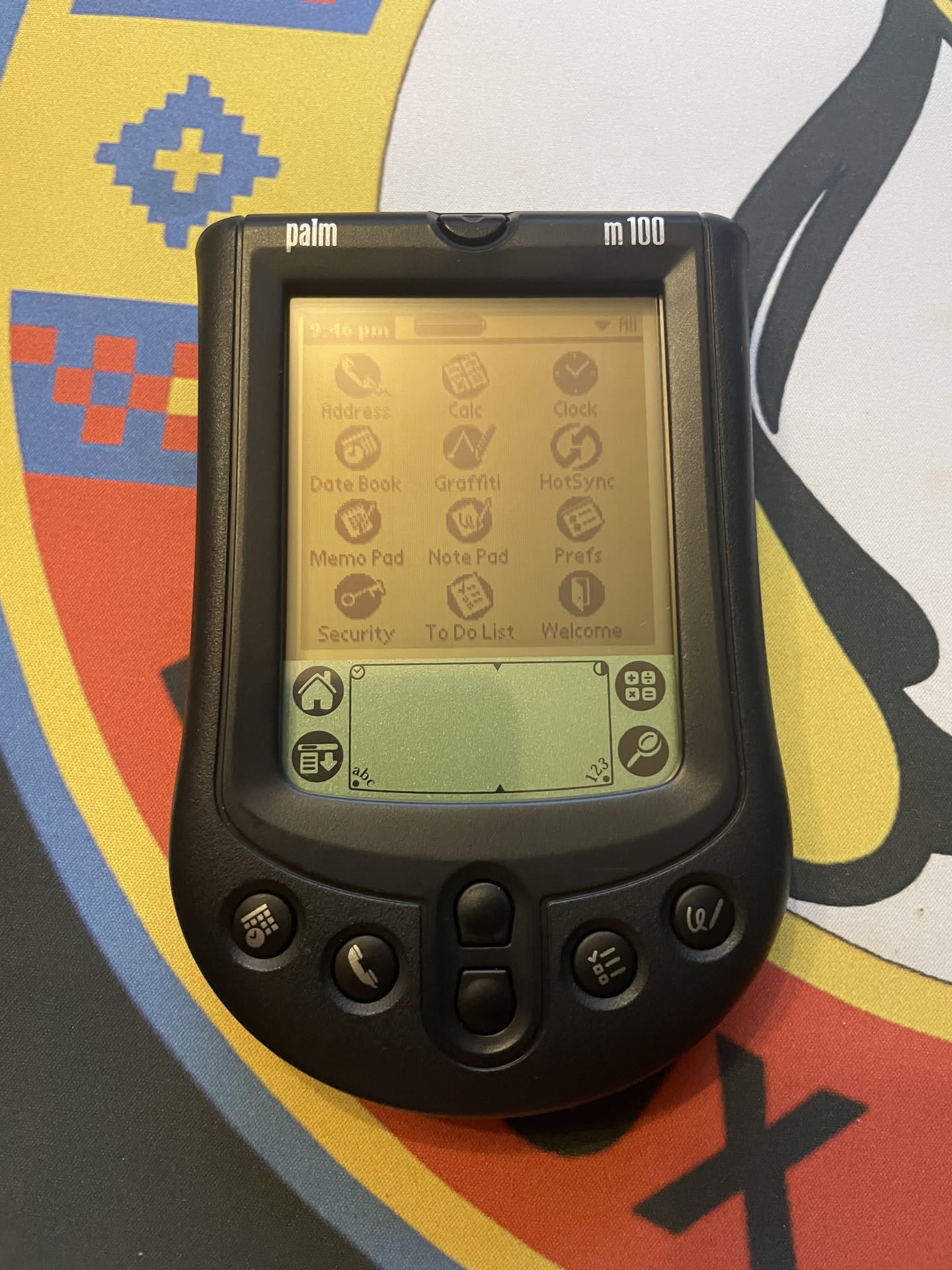
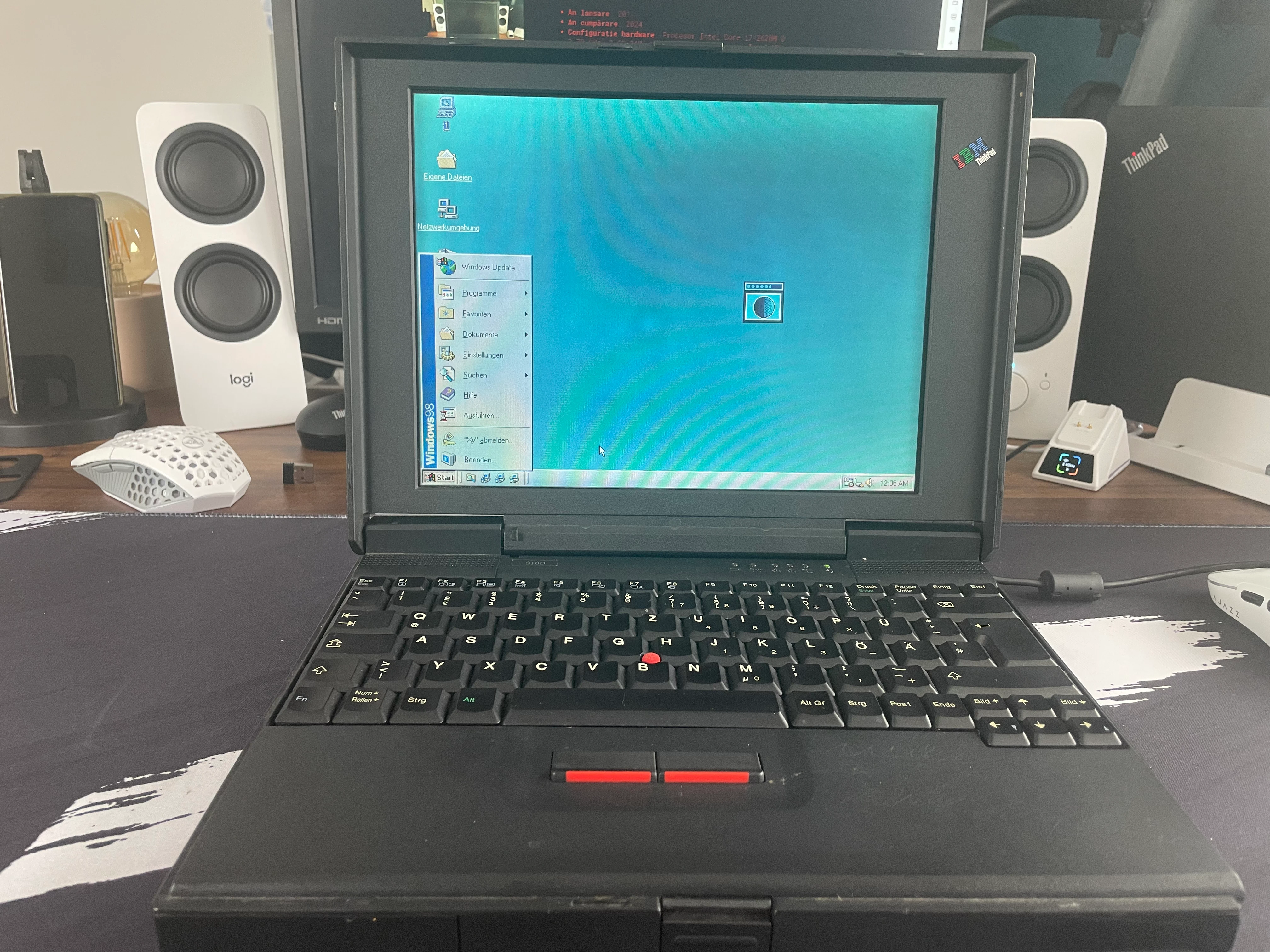
Cel mai vechi este IBM ThinkPad 310D din 1997. L-am adus în colecție anul trecut și de atunci stă frumos alături de celelalte laptopuri pe care le-am strâns de-a lungul timpului, toate expuse într-un fel de muzeu digital pe care l-am făcut chiar eu, ThinkPad Museum. Dacă vă plac laptopurile vechi, vă recomand să aruncați o privire, sunt câteva modele acolo care merită văzute.
Ce mă fascinează la 310D e cât de simplu era totul pe atunci. Are un procesor Pentium, 32 de megabytes de memorie și un hard disk de un gigabyte, cifre care astăzi sună aproape ca o glumă, dar pentru vremea aia erau lucruri respectabile. Ecranul are o rezoluție de 800 pe 600 de pixeli și o diagonală de doar 12,1 inch, deci e mic și compact, exact genul de laptop pe care îl luai cu tine fără să te gândești de două ori. Design-ul e simplu, robust, fără fițe, genul acela de construcție care spunea clar „sunt făcut să funcționez, nu să arăt bine”.
Nu știu dacă e cel mai vechi lucru din viața mea în sens strict, probabil am pe undeva vreo carte sau vreun obiect de familie mai vechi de atât, dar dacă vorbim despre lucruri pe care le-am ales eu conștient să le țin și de care sunt atașat, 310D e clar răspunsul. Și cine știe, poate peste câțiva ani o să adaug ceva și mai vechi în colecție.
-
Am descoperit rapid că era mai mult decât un concept gol sau un sentiment de nostalgie pentru web-ul anilor '90. Era o mișcare cu idei concrete, protocoale și o comunitate activă! Pe măsură ce le-am citit wiki-ul, am înțeles din ce în ce mai bine poziția lor și inteligența propunerilor lor.

bine ați navigat pe insula mea de pe internet